Your MiniProf instrument must be running firmware version 4.2.0 or newer to connect to MiniProf Criterion Version 4.0 or later.
You find the instrument’s firmware version here:
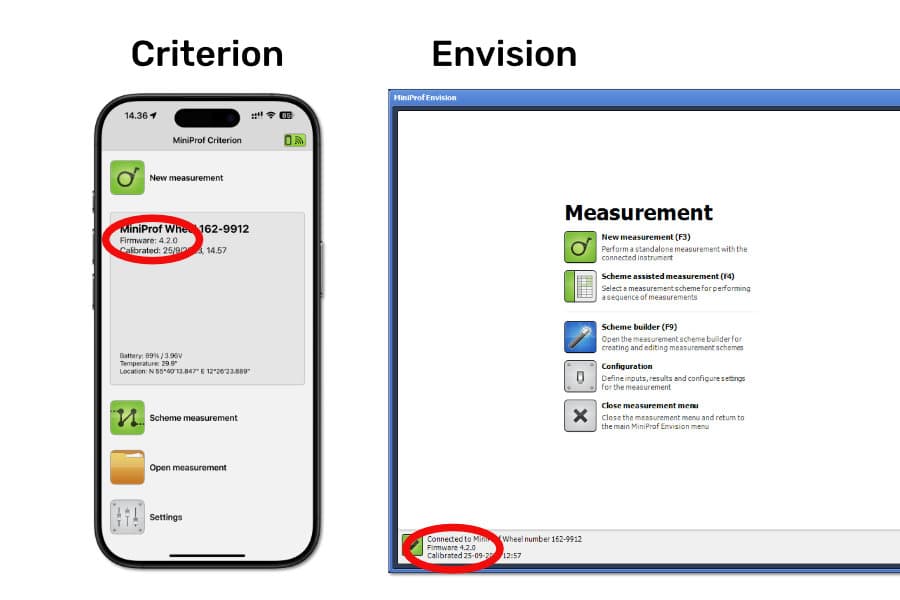
If your instrument is using an older firmware version, you have the following options:
Firmware upgrades are automatically included as part of a standard service and re-calibration, whether performed by us or your local MiniProf agent.
If needed, you can also send in your instrument specifically for a firmware upgrade, without a full service.
For more information, please contact us at miniprof@greenwood.dk.
If your instrument’s firmware has not yet been updated, you can keep using MiniProf Criterion Version 3.0 for Android, which remains fully compatible with older firmware.
To install this version:
- Download the APK file.
- Follow the installation guide for step-by-step instructions.
If you have already installed MiniProf Criterion 4.0 on your Android device and need to downgrade to Version 3.0 for compatibility reasons, simply:
- Download the Version 3.0 APK file.
- Reinstall the app following the installation guide.
For detailed information on instrument compatibility, please refer to the Criterion Compatibility Chart.